medOne
An EMR and practice management platform for US hospital systems, designed against the category's tradition of dense tables and one-size-fits-all chrome.
- medOne
- Lead Product Designer
- 2022
Context
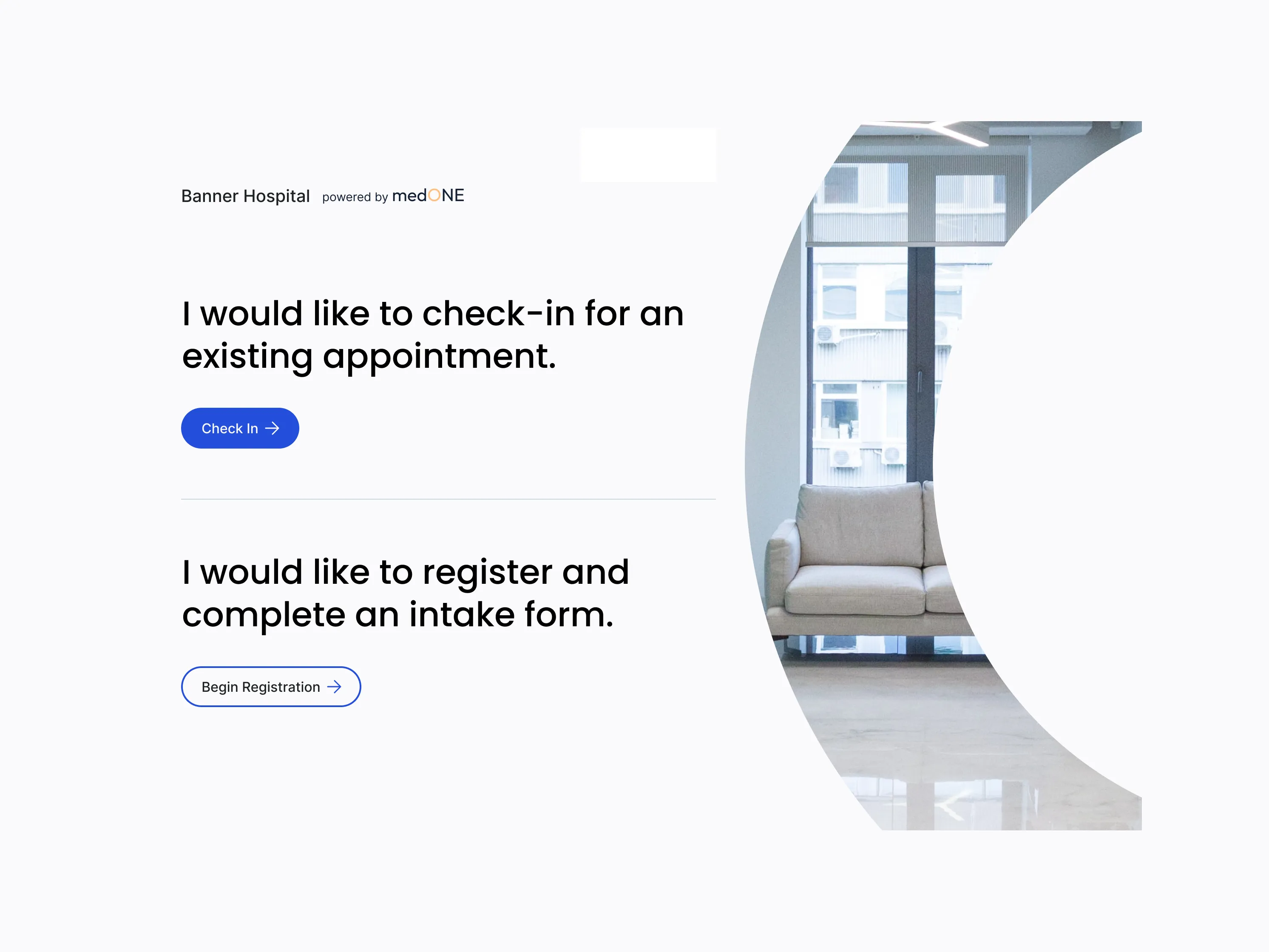
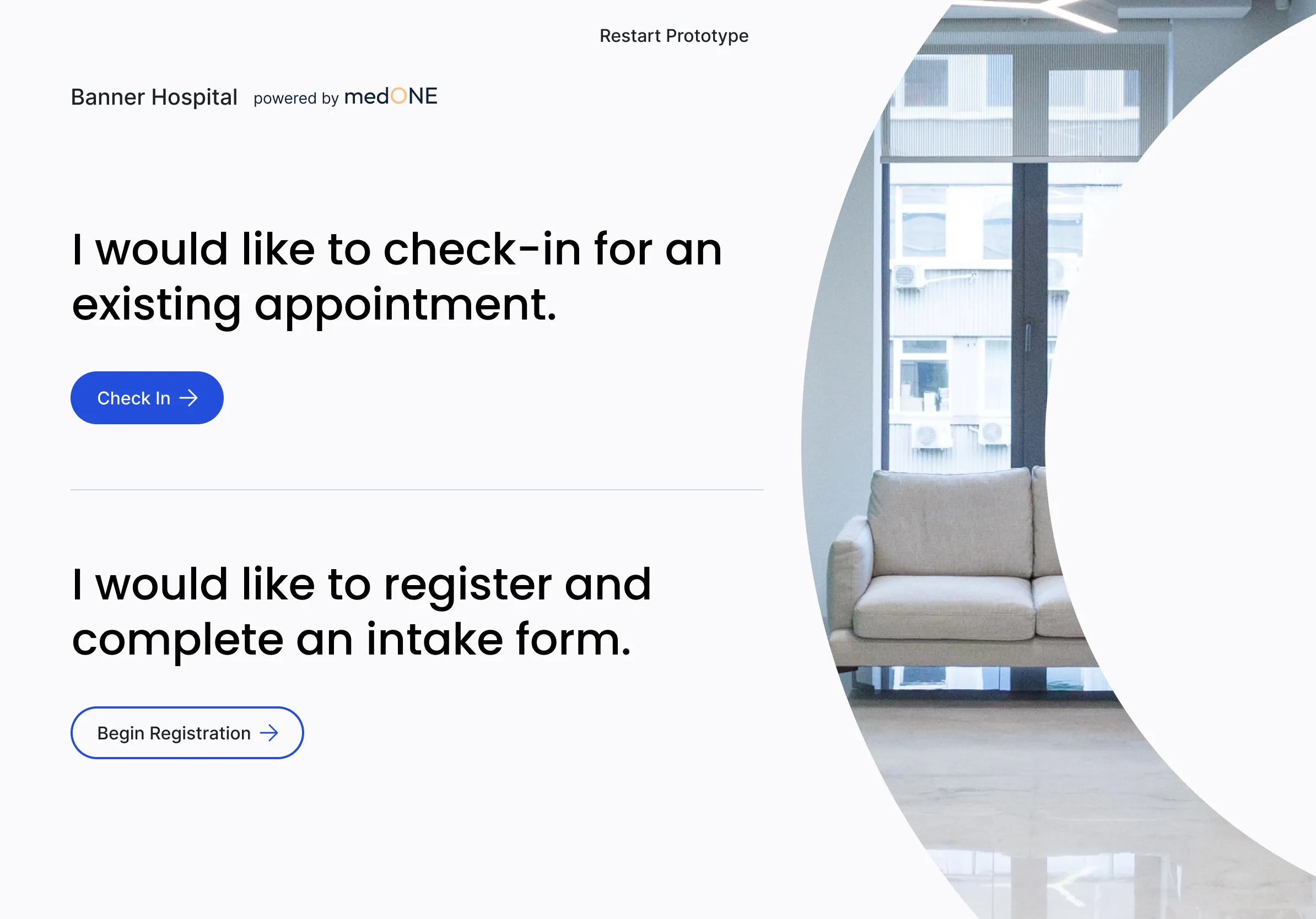
medOne is a US white-label practice management and EMR platform — the chrome that hospital systems rebrand and run their clinical operations on. The Banner Hospital co-brand on the patient kiosk shows how it ships in the wild: the host hospital owns the front door, medOne owns everything behind it. Scheduling, prescriptions, vaccinations, allergies, billing, attachments, patient portal, kiosk. Multi-role, multi-tenant, multi-module.
Enterprise medical software is a category with a famously low ceiling for design quality. The five platforms we benchmarked against — drchrono, PracticeSuite, Practicefusion, Athenahealth, AdvancedMD — all share the same DNA: dense tables, status-as-text, expert-only decoding, one chrome for every role. They’re the products clinicians complain about every day and use anyway, because switching costs are higher than the friction. medOne’s bet was that the next generation of practice management could be built without that compromise.
I joined as Lead Product Designer in 2022, owning the Prescriptions and Scheduling modules end-to-end. The platform was mid-build with a multi-designer, multi-PM team — other modules had their own owners, and the design system was shared infrastructure I worked within rather than authored.
Research and discovery
The brief was clear about the modules. It was less clear about the people. Prescriptions and Scheduling sound like discrete features, but in a hospital they’re shared workflows — a prescription touches the physician who writes it, the receptionist who schedules the follow-up, the admin who manages the practice’s billing reconciliation, the pharmacist who fills it, the patient who carries it. Designing either module without first understanding that web of roles would have produced what every competitor already shipped: a flat table that pretends one user exists.
So I started with discovery interviews — facilitated walkthroughs with practitioners on the existing software they used daily, mostly Harris CareTracker. Multi-stakeholder sessions with physicians, practice owners, and admin staff, where the goal was less “what features do you want” and more “show me your day.” What’s actually open on your screen at 8:30am? Where do you get stuck? What do you avoid touching? Who do you trust to do what?
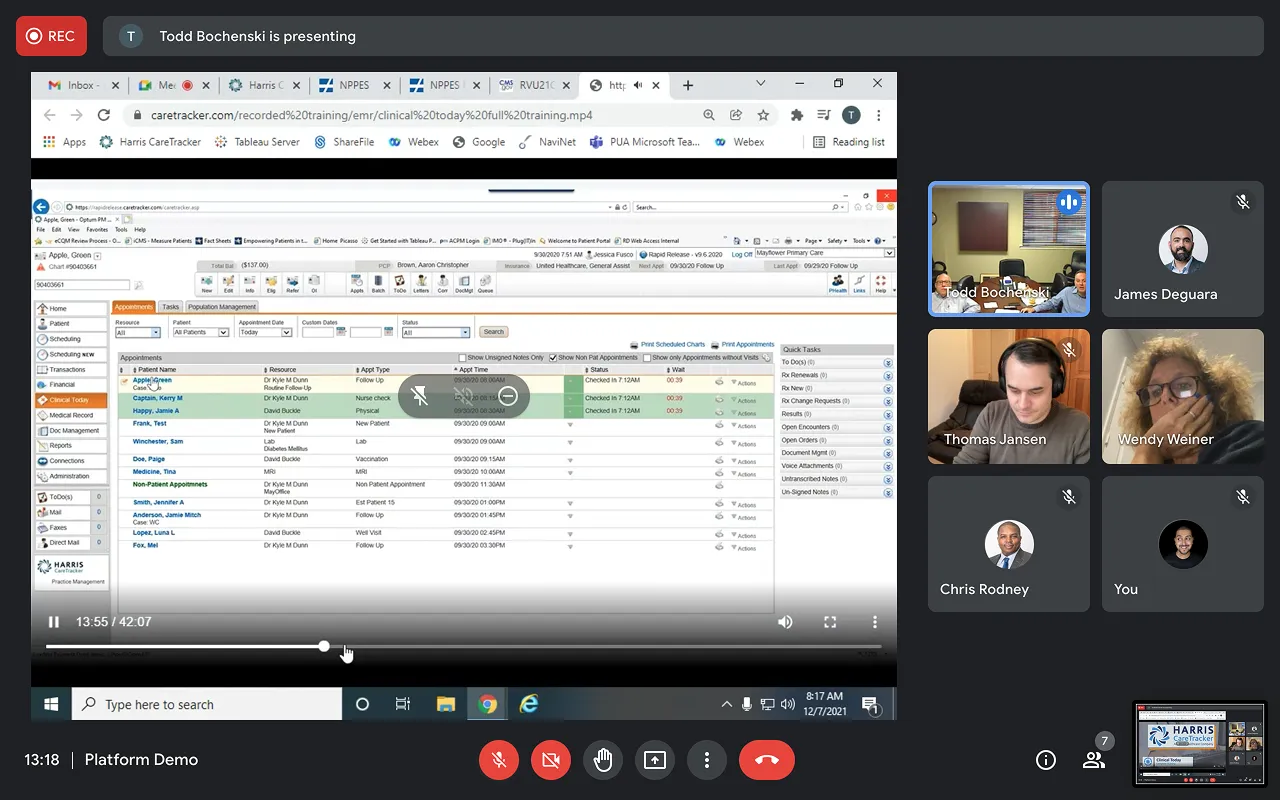
Three pain-point clusters surfaced consistently across sessions.
Density without hierarchy. Every screen showed everything. Appointments Today rendered as a flat table with eleven actions hidden behind a single icon — Pull, Visit, Visit Summary, Progress Note, Open Activities, Patient Tracking, Encounter Form, Edit Demographics, Pmt Open Items, Payment, Add to Waitlist — and a right-rail Quick Tasks panel where every counter read (0). Information was present; priority wasn’t.
Status as string. Critical clinical state lived in lowercase text. “Checked In 7:12AM,” “Overdue,” “Discontinued.” A prescription three days from expiry looked identical to one with thirty days left. An allergy noted as “Severe” sat in the same visual weight as one noted as “Mild.” The decoding burden was the user’s, every time.
One-size-fits-all chrome. The same dense view served physicians, admins, receptionists, and patients. A receptionist scheduling appointments and a physician writing prescriptions worked through identical screens with identical density, neither tuned to the question they actually needed answered.
Alongside the interviews I ran a competitive teardown of the five major US platforms — drchrono, PracticeSuite, Practicefusion, Athenahealth, AdvancedMD — feature by feature, with screenshots and a Pros / Cons / Opportunities column for each. The teardown confirmed what the interviews implied: the category had converged on a local maximum, and nobody had broken out of it. Athenahealth’s “complex navigation,” AdvancedMD’s “too many data not sorted hierarchical” — these weren’t bugs in those products, they were the design tradition the entire category had inherited.
By the end of research I had three things I didn’t have at the start: a working map of who actually uses these systems and how, a confidence that the existing competitor pattern was a ceiling worth pushing past rather than a floor to match, and a short list of design principles — hierarchy over density, severity as a first-class visual language, role-aware information architecture — that would carry through to both Prescriptions and Scheduling.
Approach
The research left me with a map of users, a critique of the category, and three design principles to test against. What it didn’t leave me with was a plan for two complex modules. Prescription creation alone touches four roles, two authorization branches, and at least a dozen distinct decisions a prescriber makes between “patient needs medication” and “prescription is active.” Translating that into a buildable design required a step in between research and pixels — one I leaned on heavily for both modules.
Story mapping the work
For Prescriptions I broke the module into four epics: See existing prescriptions, Create / General Details, Create / Medications, and Create / Submit, Edit. Each epic decomposed into a set of role-tagged user stories — “as a prescriber, I want to enter/view patient information, so that I suggest right medicine”; “as a prescriber, I want to set dates for prescription and expiration, so that patient knows when they can use prescription”; “as a patient, I want to receive PDF copy of prescription on my email, so that I can use it at pharmacy and instructions.” Each story carried acceptance criteria and implementation notes attached directly to the card, color-coded for readiness state.
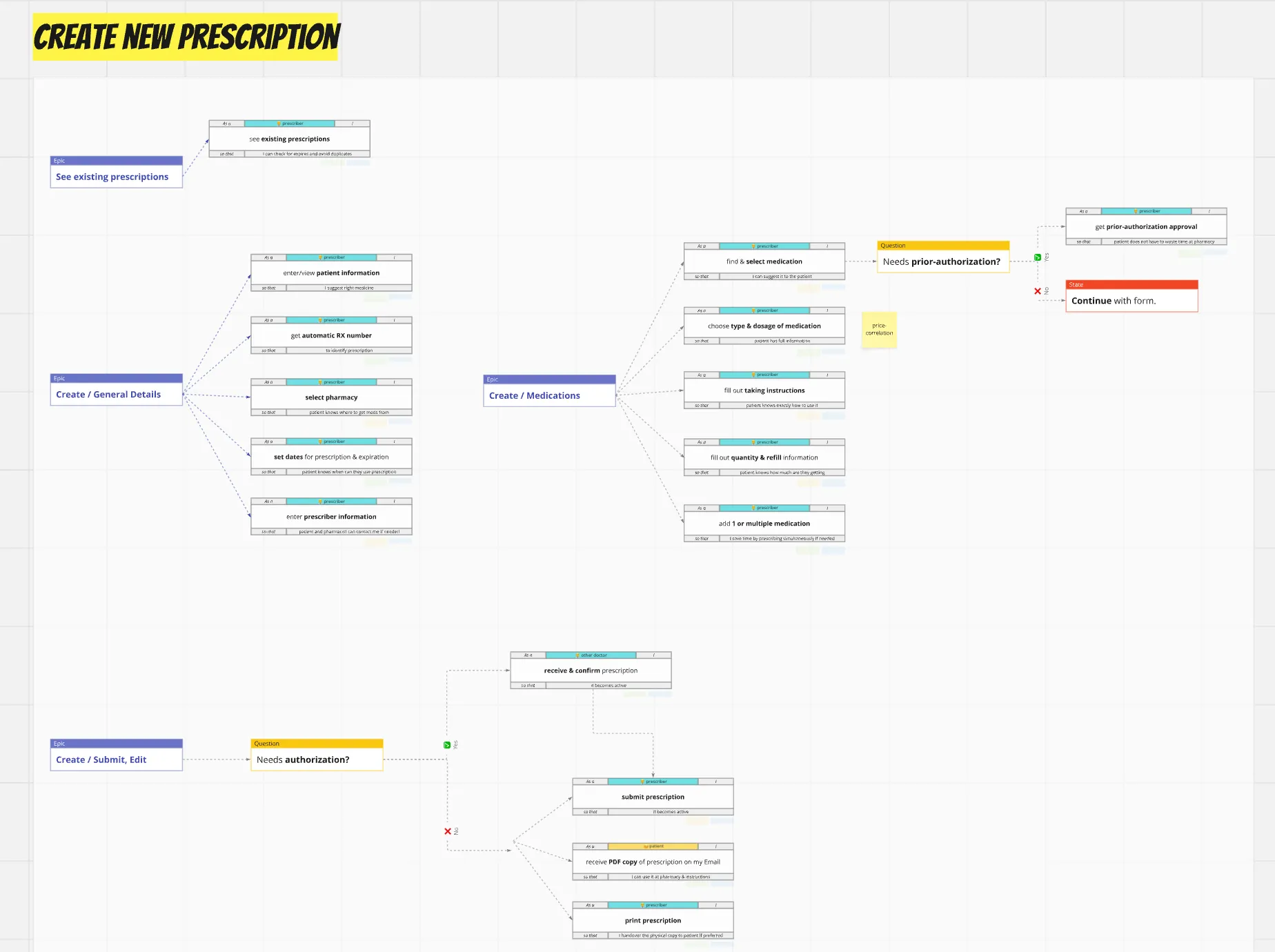
The map also captured the decisions the flow had to handle, not just the steps. A “Needs prior-authorization?” diamond branched the medication selection path; a “Needs authorization?” diamond branched submission; cross-functional notes — like “price-correlation” attached to dosage selection — surfaced where clinical decisions touched insurance and cost considerations the team hadn’t yet accounted for.
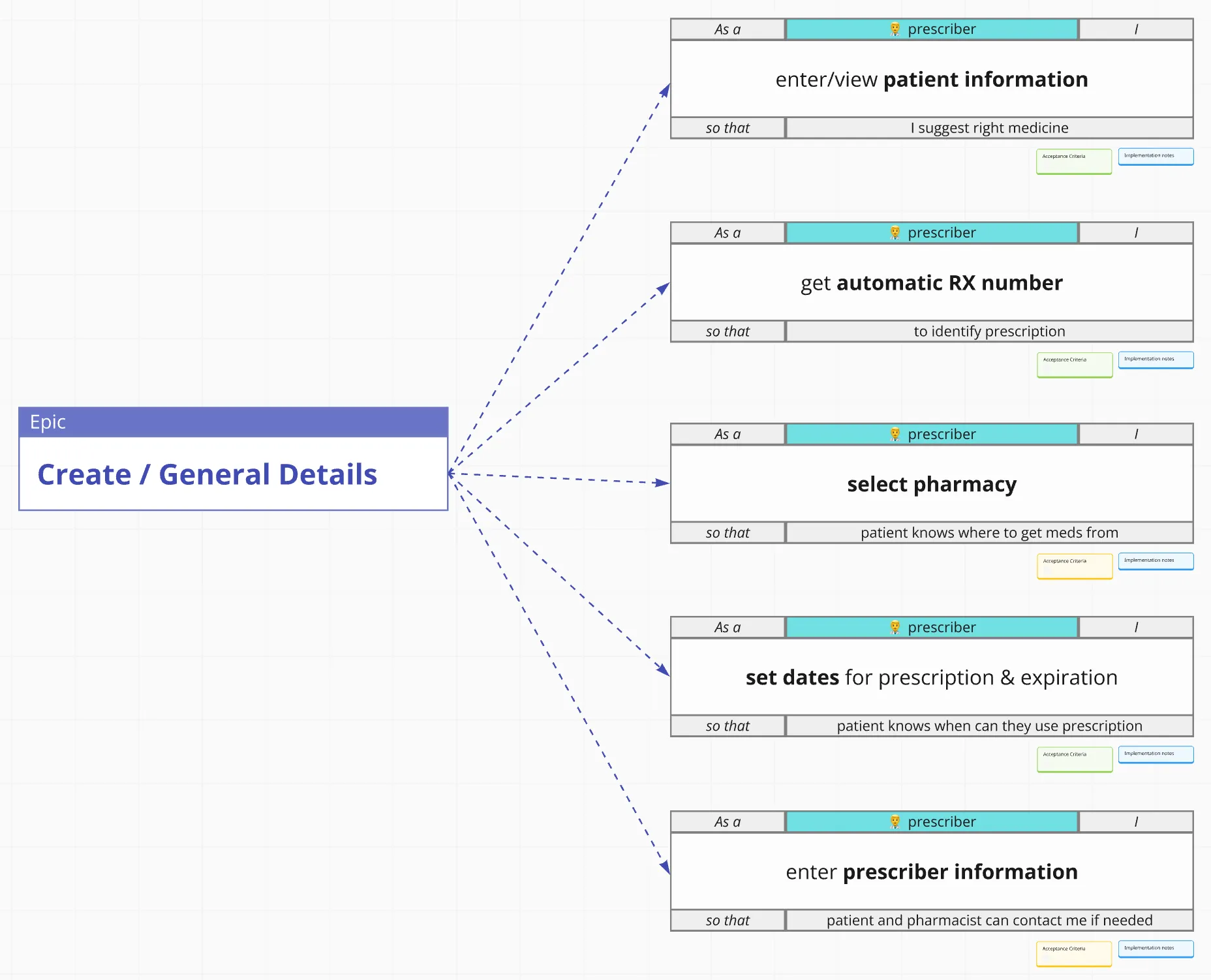
This artifact became the contract between design, product, and engineering. The PMs could prioritize stories within and across epics; engineering could scope tickets against acceptance criteria; I could design knowing exactly which decisions the UI needed to support and which it didn’t.
Mapping the system
Story maps capture what gets built. They don’t capture sequence or handoff. For that I built an end-to-end user flow covering the full clinical lifecycle from appointment booking through billing, with three role swimlanes — Receptionist + Admin, Physician + Doctor, Patient — and decision points (Patient attend? Need test? Create prescription?) that routed work between them. Every node was tagged with a ticket ID (ME-67 through ME-153) traceable back to the backlog.
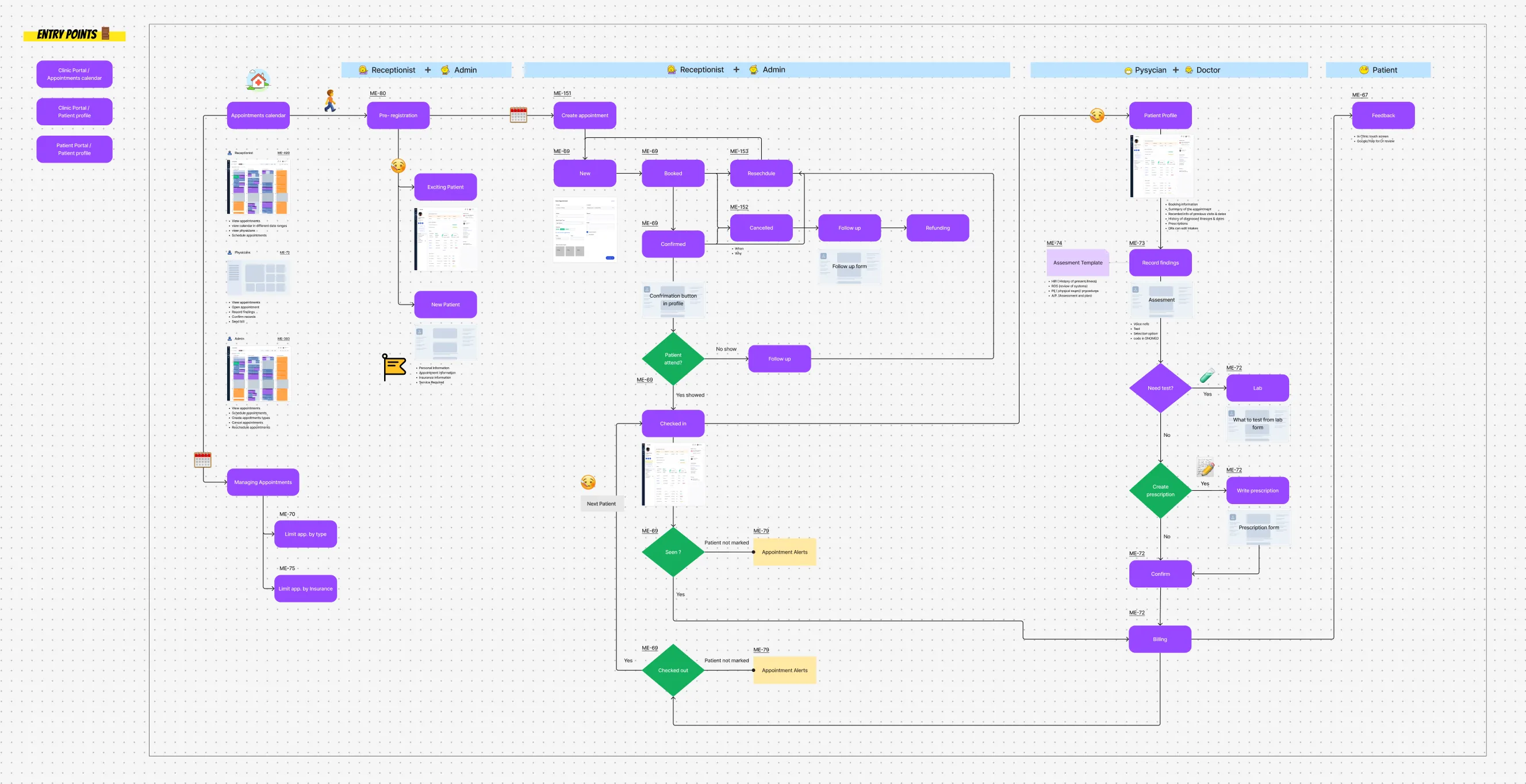
The flow surfaced things the story map couldn’t. It showed where receptionist actions blocked physician actions and where physician actions blocked billing. It showed which alerts (ME-79 Appointment Alerts) needed to fire when which states weren’t reached. It showed the patient kiosk and patient portal as legitimate entry points, not afterthoughts. And it gave the team a single artifact to walk through with stakeholders when explaining how a piece of work fit into the larger lifecycle.
Three principles, applied
With the structure mapped and the sequence understood, the design work itself became more focused. Three principles from research carried through to UI consistently.
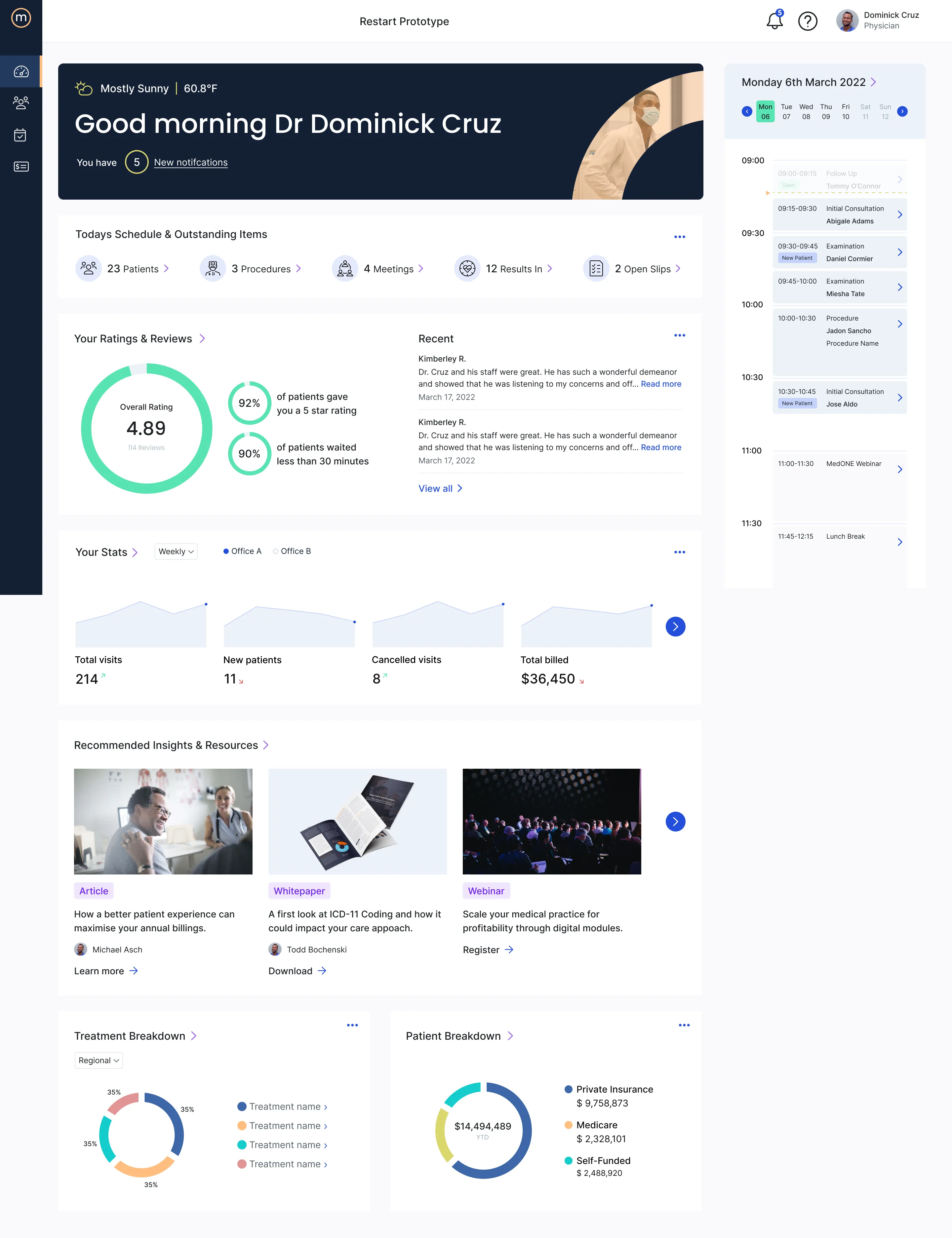
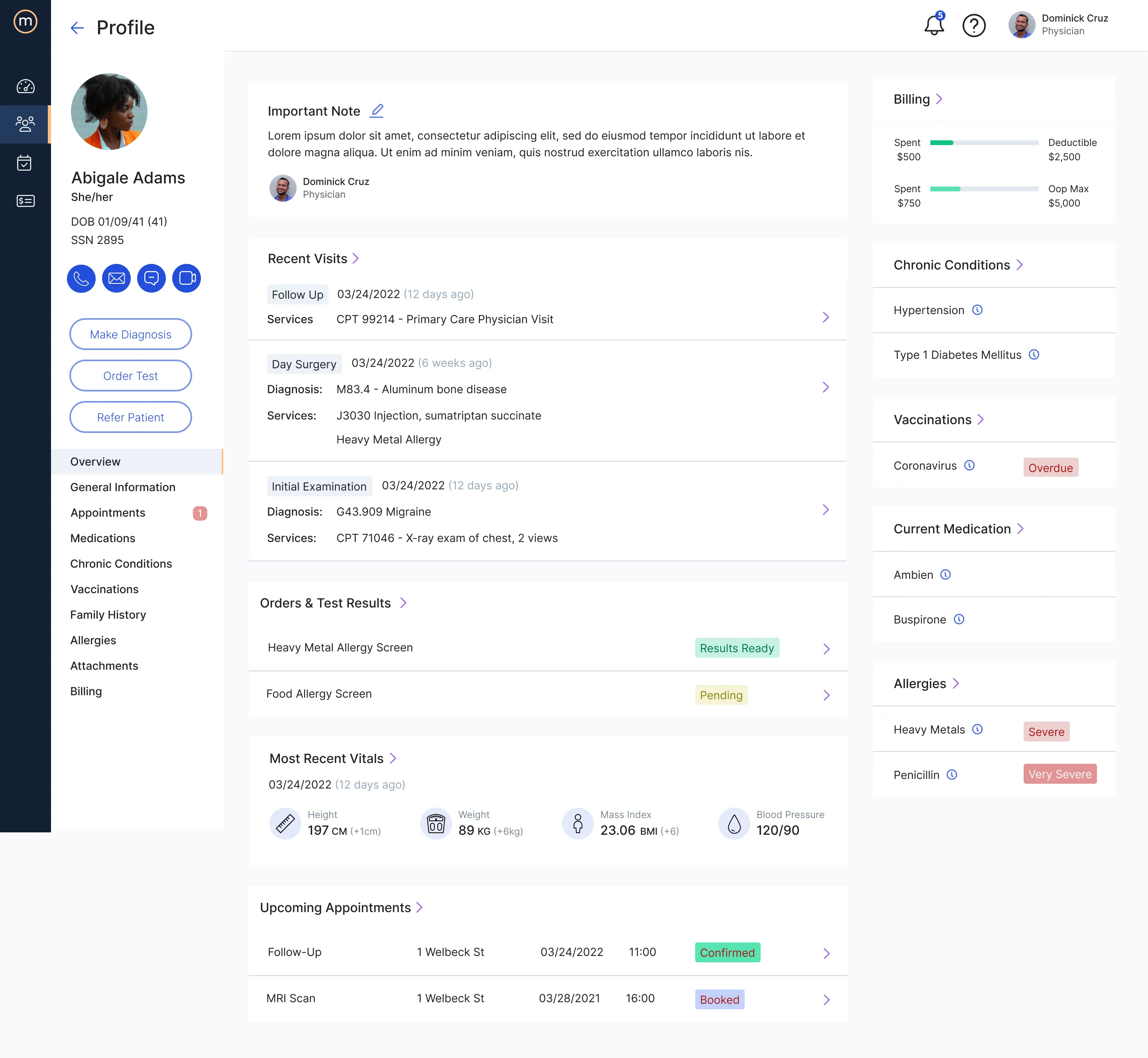
Hierarchy over density. Where competitors showed everything at once, medOne used hierarchy to surface what matters now. The Physician Dashboard’s “Today’s Schedule & Outstanding Items” strip — 23 Patients, 3 Procedures, 4 Meetings, 12 Results In, 2 Open Slips — replaces a flat appointment table with a five-counter glance. The patient profile right rail compresses Chronic Conditions, Vaccinations, Current Medication, and Allergies into a clinical safety summary the physician scans before walking into the room.
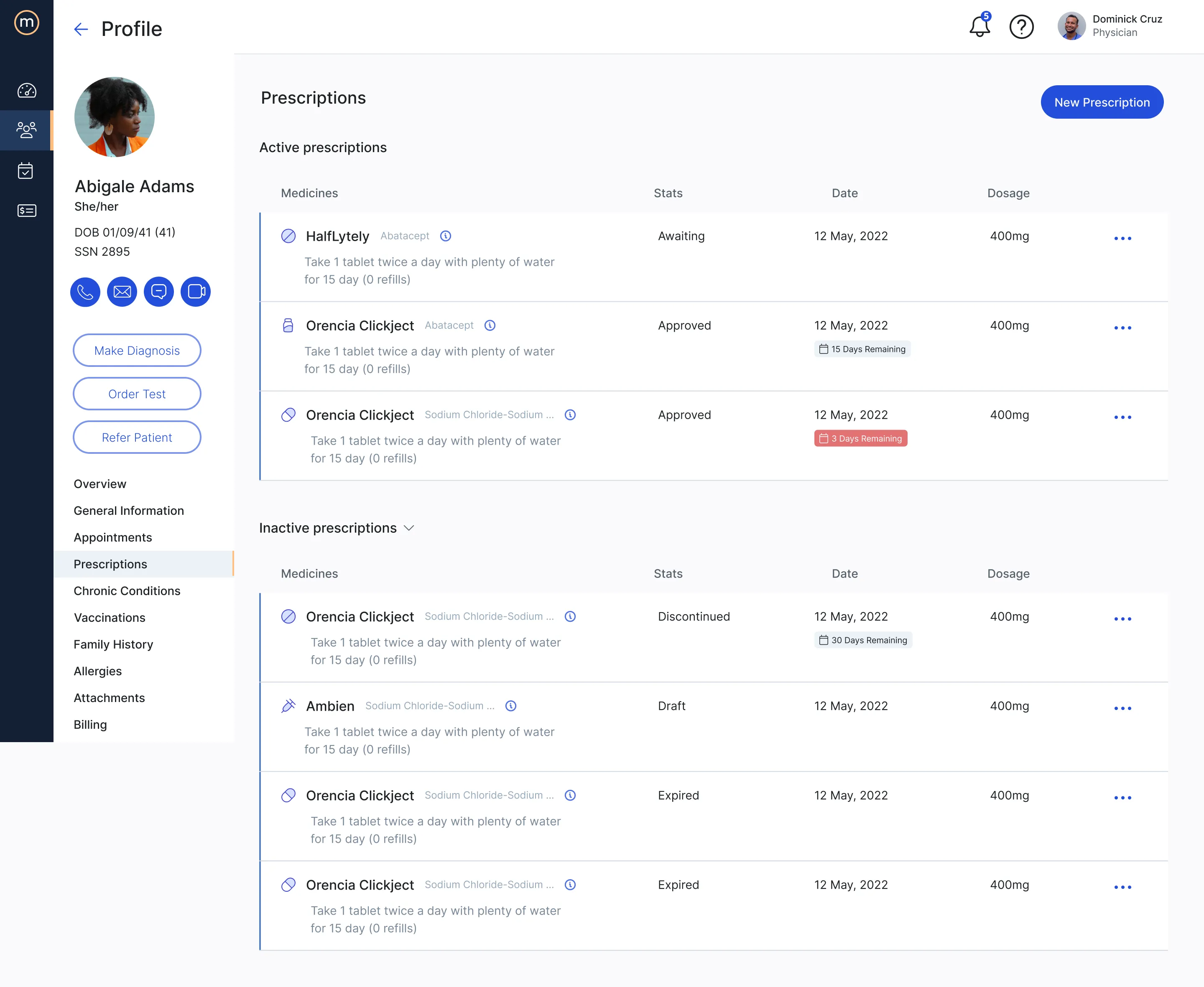
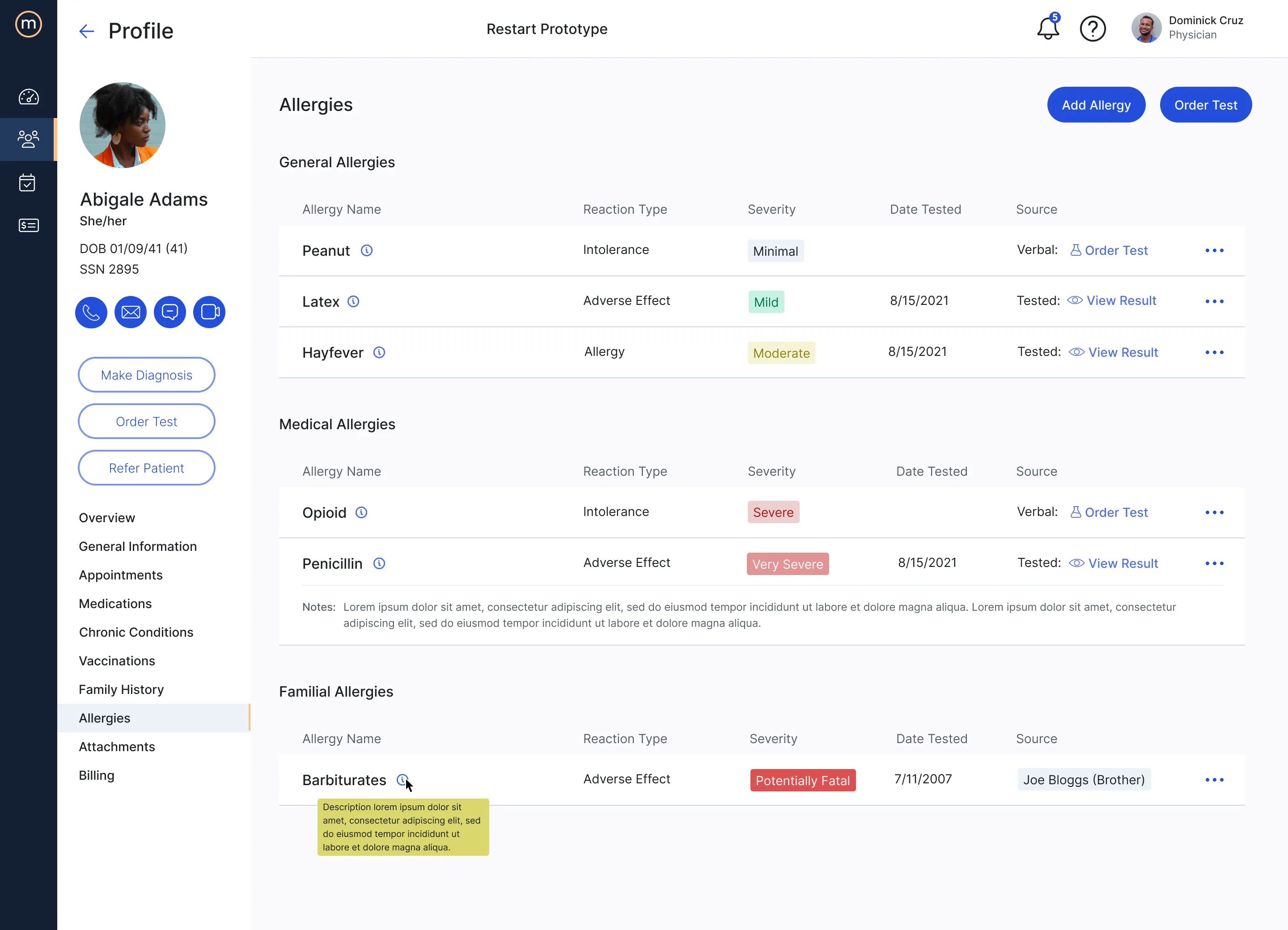
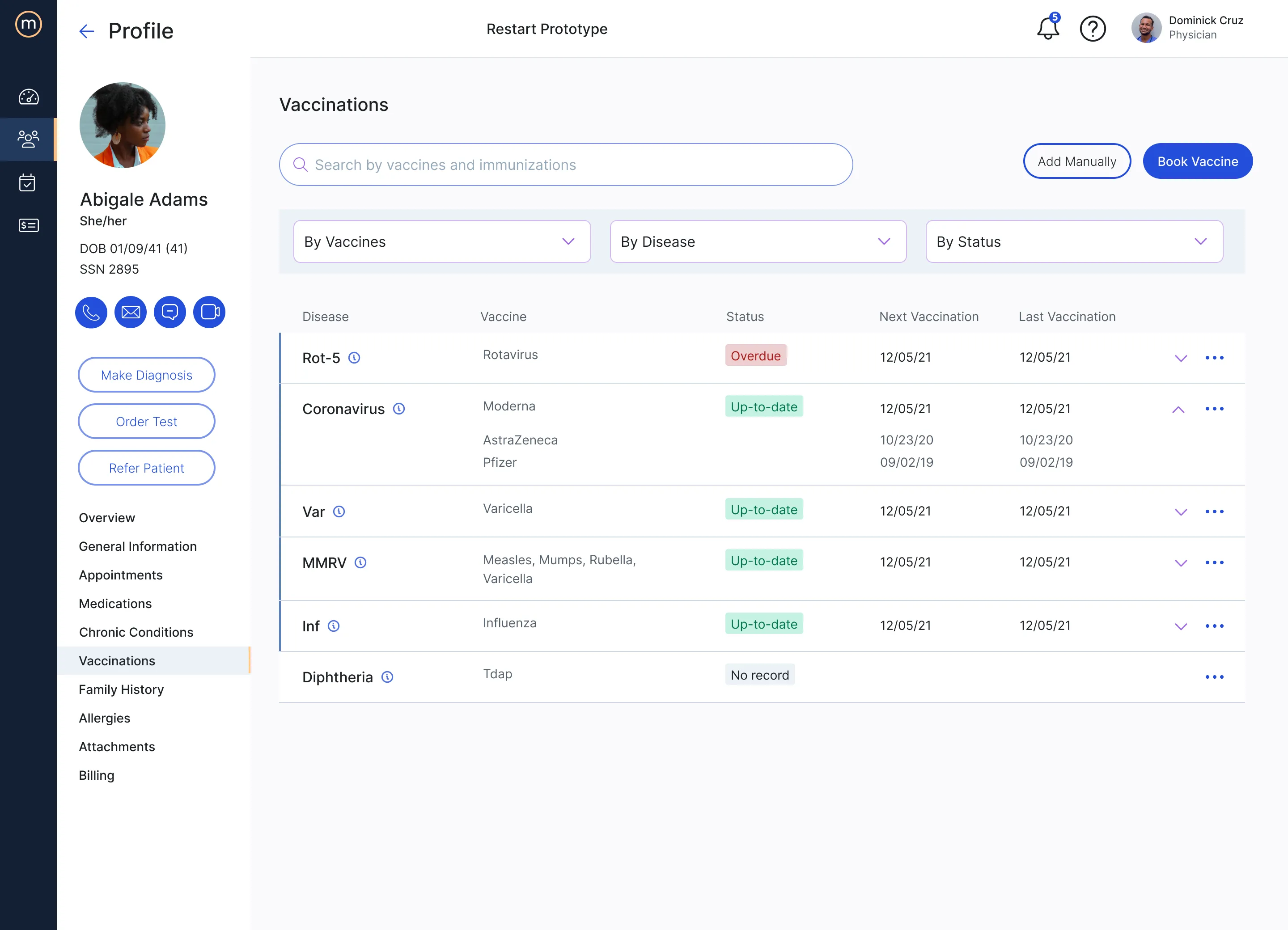
Severity as a first-class visual language. The same color and badge logic encodes urgency across every clinical surface. Allergies scale from Minimal to Mild to Moderate to Severe to Very Severe to Potentially Fatal. Vaccinations show Up-to-date, Overdue, or No record. Prescriptions move from Awaiting through Approved to Discontinued, Draft, or Expired, with red badges escalating attention as expiry approaches three days. Family History distinguishes Existent from Non-existent hereditary risk. The legacy systems hid this information in lowercase strings; medOne makes it the first thing the eye lands on.
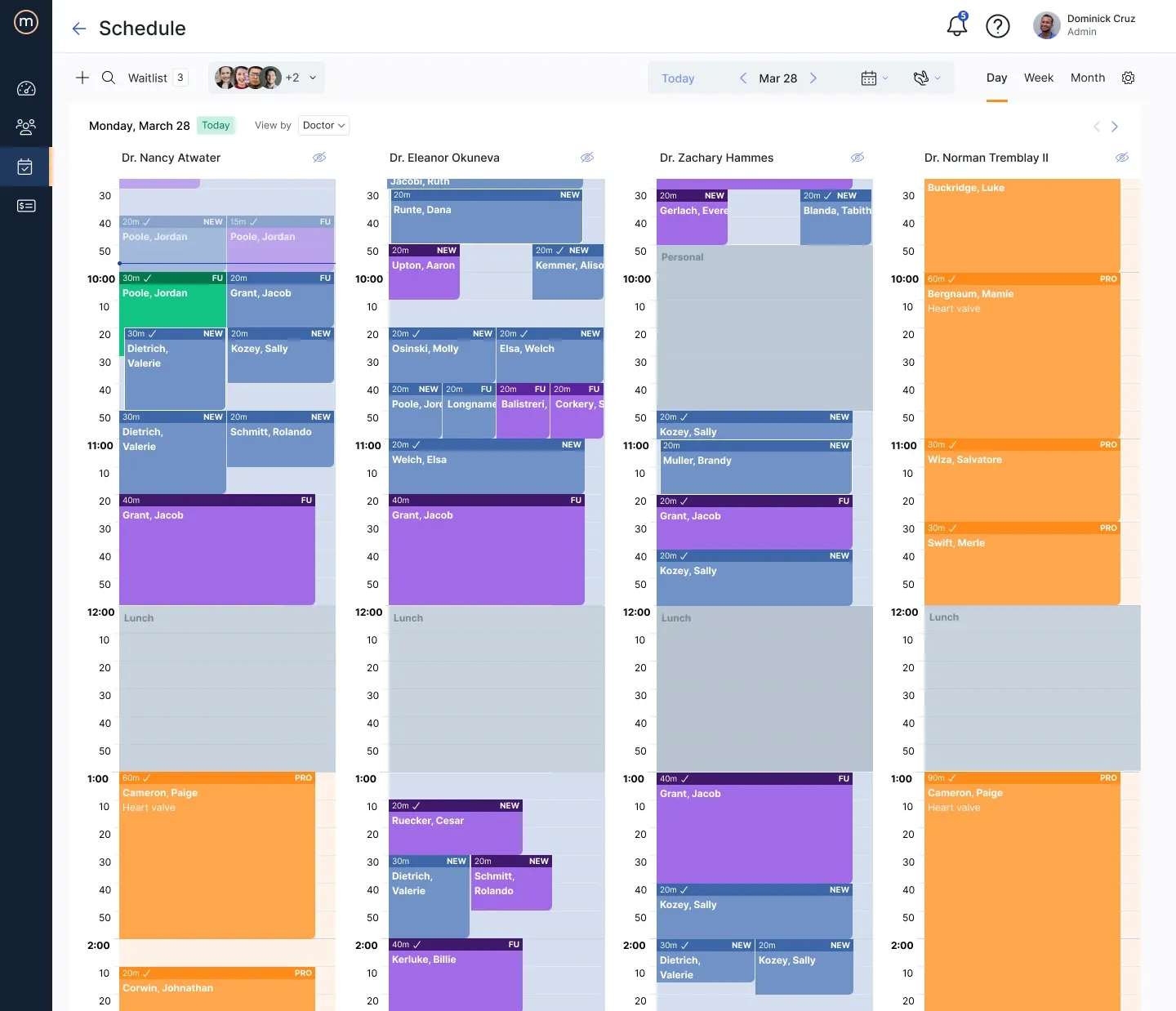
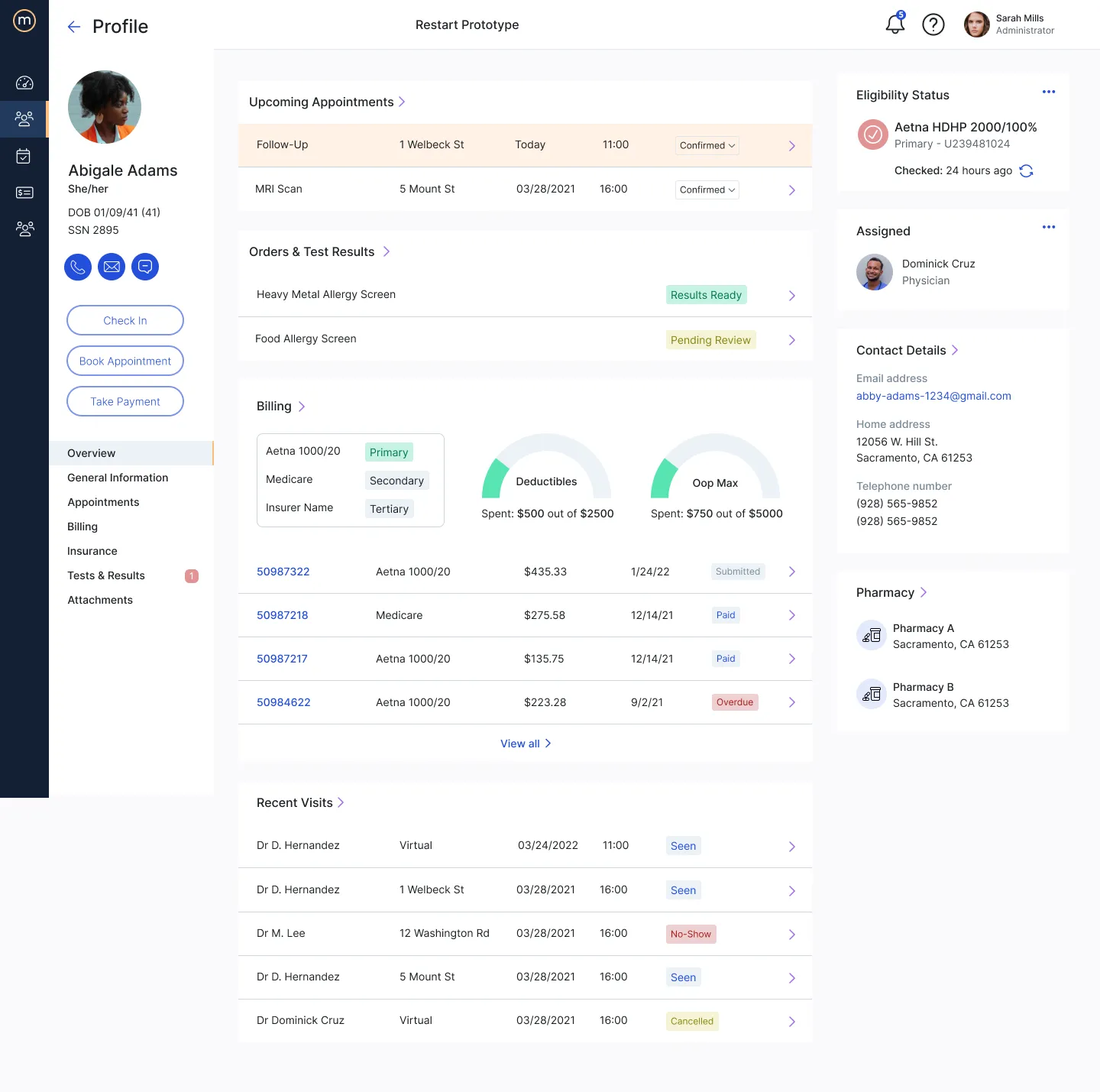
Role-aware information architecture. The same shell serves Physician, Admin, and Receptionist, but the dashboard, quick actions, and module emphasis reshape per role. Dr. Cruz’s view leads with patient throughput, ratings, and his next appointment; Sarah Mills’ admin view leads with billing batches, financial reconciliation, and the multi-physician schedule grid. The patient kiosk and patient portal share the same brand language but strip out everything irrelevant to a patient’s task. One platform, three products.
Within Prescriptions and Scheduling specifically, these principles produced two modules that hold their own against the legacy category — not because they invented a new pattern, but because they applied a coherent set of decisions consistently where the incumbents had let inconsistency accumulate.
Solution
Prescriptions
Scheduling
The Scheduling day view is the receptionist and admin’s working surface — and the direct answer to the flat Appointments Today table from research.
Role-aware shell
The same shell serves Physician, Admin, and Receptionist — the dashboard, quick actions, and module emphasis reshape per role. Dr. Cruz’s view foregrounds patient throughput, ratings, and his next appointment.
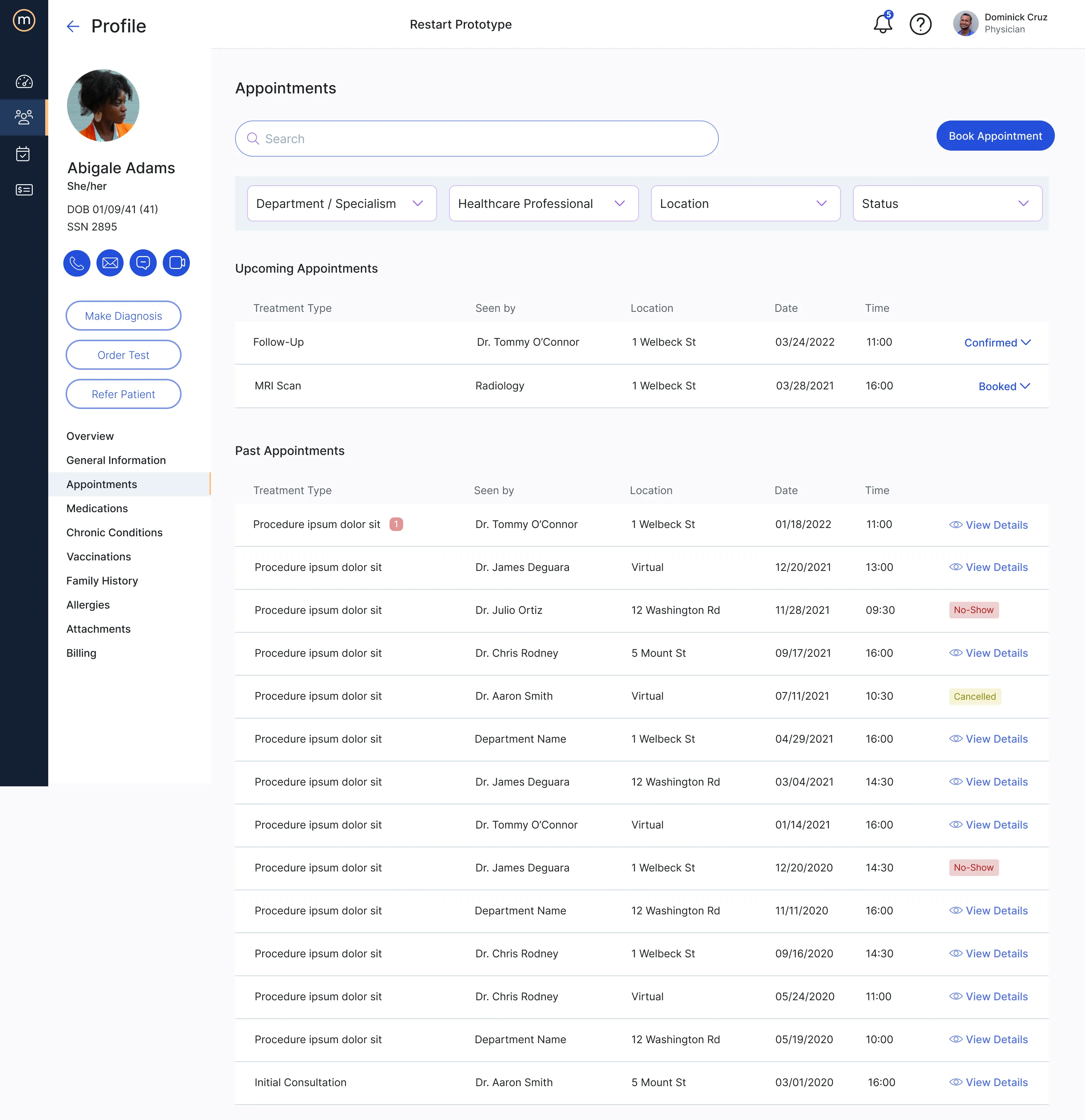
The same role split runs through the patient profile. The physician’s view foregrounds clinical reading; the admin’s view of the same record foregrounds eligibility and billing.
Severity as visual language
Multi-tenant kiosk
Outcome
The two modules shipped into a multi-tenant production platform serving US hospital systems. Prescriptions and Scheduling each went from blank backlog through story map, flow, design, and engineering handoff in their respective release windows.
The story map and user flow remained live artifacts the team continued to reference well after the initial design work was done — used to scope subsequent stories, walk new joiners through the lifecycle, and check whether new feature requests fit the architecture or required a new branch.
Reflection
A few things this project clarified for me that other engagements hadn’t.
Discovery is the work, not the preamble. The instinct on a tightly-scoped brief — “design Prescriptions and Scheduling” — is to start sketching. The interviews forced me to slow down and learn the role topology before committing to any pattern. Every design decision downstream got cheaper because of that investment.
Story mapping scales where wireframes don’t. Prescriptions had too many branching decisions to hold in flat artifacts. Decomposing it into epics and role-tagged stories with acceptance criteria created the contract that let design, product, and engineering move in parallel without losing coherence.
Operating inside a shared design system is its own discipline. medOne’s system was authored elsewhere and maintained by others. My job wasn’t to extend it or critique it — it was to apply it consistently across two modules that had to feel native alongside the work of designers I wasn’t sitting next to. That meant trading off invention for fluency, which is a tradeoff worth getting comfortable with.
Kawader →
Designing AI-enabled flows for Qatar's national workforce platform — and making the case for agentic forms over chat.